

Systems to Manage a Growing Rental Portfolio: Build a Scalable Operating Plan
A growing rental portfolio rarely gets harder just because you own one more property. It gets harder when tenant updates sit in email, maintenance requests live in texts, and financial records are scattered across spreadsheets. The systems to manage a growing rental portfolio aren’t just another app. They’re connected workflows that turn information into clear next steps.
If you rely on memory to follow up on a repair, reconcile income, or spot a property slipping behind plan, small gaps can quickly become distractions. More software alone won’t fix that. You need dependable routines, consistent financial tracking, and a clear view of performance at both the property and portfolio level.
This guide explains how to build that operating plan without overcomplicating it. You’ll learn which workflows to standardize, what to track, how to connect tools to daily decisions, and when to adjust your system as you grow. We’ll also separate the acquisition pipeline from ongoing operations, so deal-finding tools support your next purchase without being mistaken for property management or accounting systems.
Key Takeaways
- Build connected routines, records, and responsibilities before adding more software.
- Map essential workflows so tenant communication, maintenance, and follow-through don’t depend on memory.
- Choose tools based on workflow fit, visibility, and upkeep, not features alone.
- Roll out systems to manage a growing rental portfolio gradually, starting with frequent or high-impact tasks.
- Use a regular portfolio review to spot emerging issues and support informed property decisions.
Why a Growing Rental Portfolio Needs Systems Before It Needs More Software
More properties mean more leases, messages, vendors, transactions, and decisions. When each item is tracked differently, details are easy to miss. The answer isn’t automatically another app. First, build systems to manage a growing rental portfolio: clear routines that show who acts, what gets recorded, and what happens next.
A portfolio operating system is the connected set of routines, records, responsibilities, and tools that keeps property operations consistent. Software can store information or automate steps, but it can’t decide who follows up or define what a completed task looks like. A property management system can refer to software used across real estate sectors. An investor’s operating system also includes the people and processes behind the tools.
What belongs in a rental portfolio operating system?
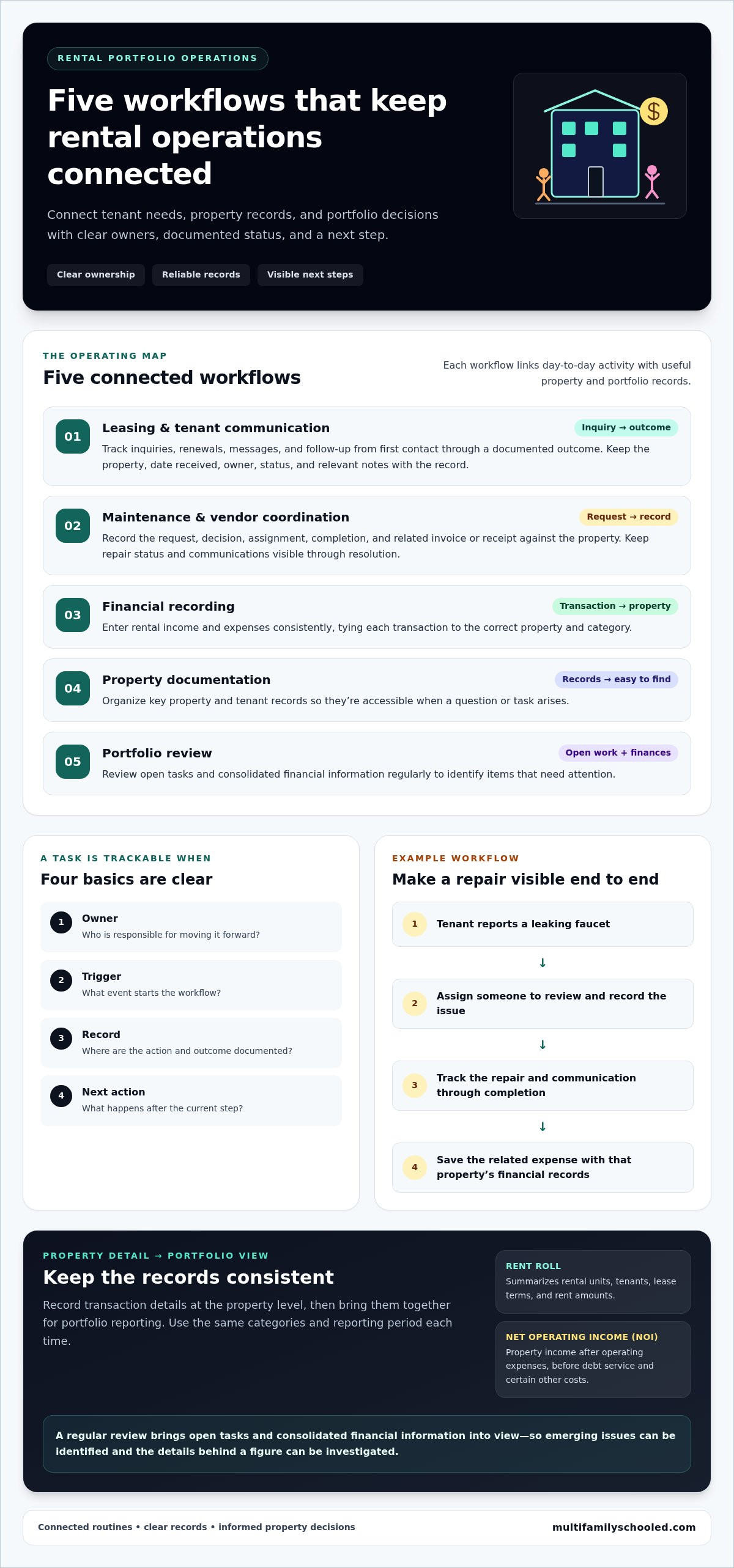
Start with leasing, tenant communication, maintenance, financial records, and recurring reviews. Give each workflow four basics:
- Owner: Who is responsible for moving it forward?
- Trigger: What event starts the workflow?
- Record: Where are the action and its outcome documented?
- Next action: What happens after the current step?
For example, a tenant reports a leaking faucet. The maintenance workflow assigns someone to review the request, records the issue and communications, tracks the repair through completion, and saves the related expense with that property’s financial records. During a regular review, the owner can see the repair status and recorded cost together. Each step connects, so no one has to rely on memory to piece together what happened.
When does a rental portfolio need more structure?
Watch for warning signs: follow-ups are missed, the same information appears in multiple places, or no one knows who owns an open task. These gaps can emerge even with a small portfolio. Establishing a repeatable process early makes it easier to add properties without multiplying confusion.
Keep the first system simple. Document how a task starts, who handles it, where its record lives, and how it’s closed. Then ask whether the process gives you visibility into activity across properties or leaves you chasing updates. The goal isn’t paperwork for its own sake. It’s a dependable operating rhythm that helps you see open issues and make decisions using clear records.
The Five Workflows That Keep Rental Portfolio Operations Connected
Connected operations depend on clear handoffs, not isolated task lists. Reliable rental operations depend on every action having an owner, a documented status, and a clear next step. These five workflows help keep tenant needs, property records, and portfolio decisions in view.
How should tenant, leasing, and maintenance tasks flow?
Route every inquiry, renewal, tenant message, and repair request into one trackable queue instead of leaving it in an inbox, text thread, or notebook. Record the property, date received, assigned owner, current status, relevant notes, and outcome. Connect the steps: acknowledge the request, document follow-up, and update the record when it’s resolved or needs further action.
For maintenance, make the sequence visible: intake, prioritization, assignment, completion, and recordkeeping. A recurring check-in can surface open requests and unanswered tenant messages before they disappear from view. Forbes also outlines best practices for managing rental properties, including core responsibilities owners can organize into repeatable workflows.
How do financial and property records support decisions?
Connect these five workflows to keep daily operations and portfolio oversight aligned:
- Leasing and tenant communication: Track an inquiry or renewal from first contact through follow-up and its documented outcome.
- Maintenance and vendor coordination: Record the request, decision, assignment, completion, and related invoice or receipt against the property.
- Financial recording: Enter rental income and expenses consistently, tying each transaction to the correct property and category.
- Property documentation: Organize key property and tenant records so they’re easy to find when a question or task arises.
- Portfolio review: Review open tasks and consolidated financial information regularly to identify items that need attention.
Keep transaction details at the property level, then bring those records together for portfolio reporting. A rent roll summarizes rental units, tenants, lease terms, and rent amounts. Net operating income (NOI) is property income after operating expenses, before debt service and certain other costs. Review the records on a consistent schedule, such as monthly, and use the same categories and reporting period each time. Consistency makes comparisons clearer, while leaving room to investigate the details behind any single figure.
The right systems to manage a growing rental portfolio connect daily tasks to reliable records. This gives you a clearer view of activity at each property and a more useful foundation for portfolio decisions.
Do You Need More Rental Portfolio Software, or Better Systems?
Buying software before defining the process can make confusion more expensive. A platform may collect messages, tasks, and financial data, but it can’t decide what information you need, who updates it, or how an open task gets closed. Before adding a tool, identify the recurring problem and map the steps that should solve it. Then assess whether your current tools can support those steps.
Which tool type fits each stage of portfolio growth?
Match the tool to the workflow, not the other way around. A spreadsheet may work for straightforward tracking with one clear owner. A specialized application can help when a recurring task needs structured records or automation. An integrated platform may fit when several workflows rely on shared information. Choose based on how well the tool supports visibility and how much effort it takes to maintain.
| Tool type | Useful fit | Consider |
|---|---|---|
| Spreadsheet | Simple, clearly owned tracking | Who updates it, how versions are controlled, and whether reporting stays manageable |
| Specialized application | A recurring workflow needing more structured tracking or automation | Whether it connects to the rest of the process and keeps records easy to retrieve |
| Integrated platform | Several connected workflows that rely on shared records | Access controls, data ownership, export options, and reporting needs |
How can investors avoid tool overload?
Start with one recurring operational problem. Before evaluating software, confirm the workflow has an owner, defined information to capture, and a clear completion step. Then compare options against those needs. Check how records can be exported, who controls access, and whether reports answer the questions you use to review the portfolio. A tool that adds data entry without improving visibility may increase upkeep instead of making the work clearer.
Keep acquisition separate from ongoing property operations. Deal-finding software supports the search for potential apartment investments, but it doesn’t replace workflows for tenant communication, maintenance, accounting, or portfolio reporting. For investors building an acquisition pipeline, apartment deal-finding software serves a different purpose from tools that organize day-to-day operations.
The best systems to manage a growing rental portfolio aren’t defined by the number of apps in use. They’re defined by whether each tool supports a clear process, keeps useful records accessible, and helps you make decisions without creating extra work. Add tools to solve specific gaps, not to compensate for workflows that haven’t been defined.
How to Build Rental Portfolio Systems Without Disrupting Daily Operations
Build in stages rather than pausing daily operations to redesign everything at once. Inventory recurring work, document how one workflow runs today, assign responsibility, then choose or adapt tools to support it. Start with a frequent or consequential task, such as tracking maintenance requests or recording property expenses. Once the process works in practice, expand it.
What should the first 30 days of system building accomplish?
Use the first month to understand the work and test one improvement, not to create a perfect operating manual. List recurring leasing, maintenance, financial, and review tasks. Choose one workflow with obvious friction, write down its current steps, and test a clearer version. Note exceptions as they arise, then revise the instructions before applying them more broadly.
- Days 1-7: Inventory recurring tasks and note where information currently lives.
- Days 8-14: Select one high-friction workflow and document its steps and handoffs.
- Days 15-23: Test the revised process at one property. Record issues and exceptions.
- Days 24-30: Update the instructions and decide whether the workflow is ready to repeat elsewhere.
How should workflows expand across multiple properties?
Keep the core process consistent, while allowing for property-specific details where they matter. Use the same property identifier across task records, financial documents, and communications. Agree on shared naming conventions so records can be found and compared. Review completed tasks and unresolved exceptions on a recurring schedule, then adjust the process when the same obstacle appears more than once.
A simple responsibility matrix prevents “someone should handle this” from becoming the default:
- Actor: The person who completes the task or next step.
- Recorder: The person who updates the status and saves the outcome.
- Exception owner: The person who decides what happens when the normal process can’t be followed.
Test the approach on one property before extending it. Use this checklist:
- List the recurring tasks and choose one to improve.
- Write the trigger, steps, responsible person, and completion record.
- Define how exceptions are flagged and who reviews them.
- Use the same property identifier and document names consistently.
- Schedule a review to check adoption and unresolved items.
A steady rollout turns systems to manage a growing rental portfolio into working habits instead of a stack of unused documents. For additional investor education and practical resources, explore the Multifamily investor toolkit.
Turn Rental Portfolio Systems Into a Repeatable Growth Engine
Reliable records turn routine operations into useful information for decision-making. When you can see what’s happening at each property, you can assess whether to hold, improve, or explore refinancing, and whether your operations are ready to support another acquisition. Records inform those decisions, but they don’t guarantee a particular outcome.
Which portfolio signals should owners review regularly?
Set a monthly review and use the same measures and reporting period each time. Focus on signals that connect day-to-day operations with property performance:
- Occupancy: Note occupied and vacant units and any upcoming lease changes.
- Rent collection: Compare expected rent with recorded payments and flag items needing follow-up.
- Maintenance: Review open requests, completed work, and expenses recorded for each property.
- Property financials: Check income and expense records for completeness and compare them with prior periods.
If a figure changes, investigate the underlying records before drawing a conclusion. The change could relate to timing, a new expense, a vacancy, or another property-specific factor. Consistent records make comparisons clearer and support better-informed decisions, but they can’t guarantee returns.
How can investors prepare for the next stage of growth?
Test whether your current workflows would remain usable if the number of properties, transactions, or open tasks increased. Can someone else follow the process? Are property records easy to separate and review? Do unresolved items stay visible? Use the monthly review to spot bottlenecks, then refine the workflow before adding more complexity.
Keep acquisition sourcing distinct from operations for owned properties. A deal-finding workflow helps identify potential investments; it doesn’t replace the ongoing work of tracking tenants, maintenance, or property finances. Build the operating capacity to manage what you own while developing a separate, repeatable process for evaluating what you may acquire.
For investors planning their next steps, the Multifamily Tool Kit offers a starting point for continued learning. Explore deal-finding software to support your acquisition pipeline, or the Mentorship Program for guided investor education. Keep building your systems to manage a growing rental portfolio alongside your investment plan, so growth decisions are grounded in clear operating records and repeatable habits.
Build Your Next Stage on a Stronger Operating Plan
Growth doesn’t require a larger stack of software. It starts with connected workflows, clear responsibility, and records you can use to understand what’s happening across your properties. Build one process at a time, review occupancy, rent collection, maintenance, and property finances consistently, then adjust as your portfolio changes.
The strongest systems to manage a growing rental portfolio make routine work easier to follow and give you a clearer basis for decisions about the properties you own. Keep acquisition sourcing distinct from ongoing operations. Deal-finding software can support your search for potential investments, while tenant, maintenance, and financial workflows support the properties already in your portfolio.
Whether you’re building your first repeatable habits or refining an established approach, investor education can help strengthen your decision-making. Multifamily Schooled offers educational resources for novice and experienced apartment investors, along with tools that support the acquisition pipeline. Explore Multifamily Schooled’s investor education and tools and take your next step with greater clarity. Keep building deliberately. A dependable operating plan can grow alongside your portfolio.
Frequently Asked Questions
What systems do you need to manage a growing rental portfolio?
You need repeatable workflows for leasing, tenant communication, maintenance, financial records, property documents, and portfolio reviews. The systems to manage a growing rental portfolio should clarify who owns each task, what starts it, where its status is recorded, and what happens next. Connect property-level records to a consistent portfolio review so you can monitor open tasks and compare financial information across properties.
Do I need property management software for a small rental portfolio?
No. A small portfolio may be manageable with spreadsheets or other simple tools if records stay accurate, tasks have clear owners, and follow-ups don’t get missed. Consider specialized software when a recurring workflow becomes difficult to track or requires more structured records. Define the process first, then choose a tool that supports it. The goal is dependable operations, not adopting software just because you own rental property.
How do I choose software to manage rental properties?
Start by naming the specific operational problem you want the software to solve. Compare options based on workflow fit, record visibility, ease of upkeep, reporting, access controls, data ownership, and export options. Check whether the tool supports the steps your team actually follows, from task intake to completion. Avoid selecting features you don’t need. A focused tool that supports a clear process can be more useful than a larger platform with unnecessary complexity.
Can spreadsheets manage a growing rental portfolio?
Yes, spreadsheets can work when tracking is straightforward, consistently maintained, and clearly owned. Use a shared property identifier, standard categories, and fields for dates, status, responsible person, and outcome. As transactions or tasks increase, watch for duplicate records, version confusion, and time-consuming updates. If those issues make reliable tracking harder, consider a specialized application or integrated platform that better fits the workflow.
What should a rental property management system track?
Track leasing milestones, tenant communications, maintenance requests, assigned owners, task status, and documented outcomes. Keep property-level income and expenses tied to consistent categories, along with relevant lease and property records. For portfolio oversight, review occupancy, rent collection, maintenance status, and financial records. The exact fields depend on your process, but every record should make it possible to identify the property, understand what happened, and see what action remains.
How often should I review my rental portfolio?
Set a consistent monthly review for occupancy, rent collection, open maintenance, and property-level financial records. Compare each property with its prior-period records and investigate changes before assuming what caused them. Keep task follow-up active between reviews so an urgent request or unresolved item doesn’t wait for the next meeting. A steady review rhythm helps you catch gaps, check record quality, and make decisions using current information.
What is the difference between deal-finding software and property management software?
Deal-finding software supports the acquisition pipeline by helping investors identify potential apartment deals. Property management software is generally designed to organize ongoing operations for properties already owned, such as tenant, maintenance, or property records. These tools serve different workflows. Finding a potential investment doesn’t manage it after acquisition, so keep sourcing and operating processes distinct and make sure each has the tools and records it needs.